
Description:
The Digital Fraud Check is an in-depth look at your subject's digital profile. This involves pulling phone metadata, matching an identity to their information, including phone number, email address and home address and generating an Identity Check Score and Identity Network Score, which give strong indications of risk level, based on the online profile of the subject.
This check utilises data provided by our trusted data partner, and a leader in fraud prevention, Ekata, and their comprehensive identity network.
The constituents that make up the Identity Network Score include:
- Predictive Risk Signals
- Aggregated externally cross-referenced fraud patterns
- Identity elements utilised in transactions
The primary data points utilised in the Identity Check Score include:
- Phone records against name
- Phone records against address
- Email records against name
- Email records against address
- Address against name
In practice, SmartSearch collates this data and the risk factors to present you with a clear-cut report indicating the risk of fraudulent or suspicious activity related to your subject, notably providing scores to make the process intuitive and efficient.
Important note: This service should not be utilised in isolation, but rather should act as further security for a subject that has been additionally verified through our SmartDoc or UK Individual Check.
Input:
The Input Section appears at the very start of the journey and is where the user enters all required information before a result can be generated. Some fields are mandatory and must be completed to run the check, while others are optional and can be provided to strengthen the overall profile. This section ensures the system has the key details it needs to perform the appropriate verification processes and deliver an accurate result.
Search Reference (Optional):
- Summary - A Search Reference is an optional field the client can use for internal referencing only
Title (Mandatory)
First Name (Mandatory)
Middle Name (Optional)
Last Name (Mandatory)
Date of Birth (Optional)
- Summary - Whilst this is optional we always recommend to clients putting this in as it makes the search more robust and drastically speeds up Due Diligence.
Mobile Number (Mandatory)
- Summary - The mobile number is a mandatory field for the Fraud Check, as it is a crucial data point utilised to explore the digital profile of the individual, and plays an important role in generating the Identity Check Score
Email (Optional)
- Summary - The email address, although being an optional field, is highly recommended to input, as it greatly assists the Identity Check Score through matching the name to the email, checking the domain, and cross-referencing with the phone number and address to create a comprehensive profile.
Country (Mandatory)
- Summary - If the UK is selected, you will have the option for Royal Mail Postcode lookup. Otherwise, every country requires similar mandatory address fields, as below.
Address Fields:
-Flat (Optional)
-Building Name/Number (Mandatory)
-Address Line 1 (Optional)
-Address Line 2 (Optional)
-Town (Mandatory)
-Region (Optional)
-Postcode (Mandatory)
Results:
Running a Digital Fraud Check produces two results: the Identity Check and Identity Network score. These both give indications of risk, with the ICS looking at matching data points together, and the INS looking closer at the potentially high-risk activity based on the identity network developed by Ekata.
Identity Check Score
The Identity Check Score verifies whether the client’s name matches the addresses, mobile
number and email provided.
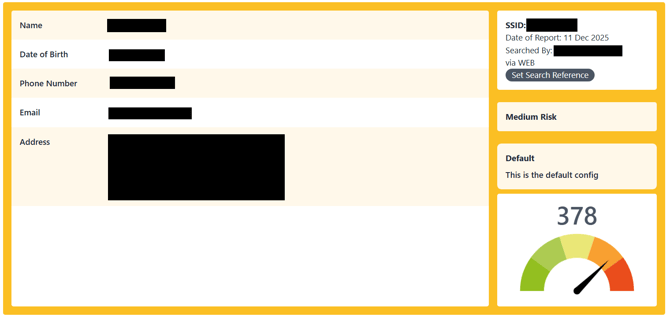 Scores are generated between 0-500, the higher the score, the riskier your client is determined to be.
• Low risk: 0-200
• Medium Risk: 201-400
• High Risk: 401-500
In the above example, we can see that this client has been gauged to be on the riskier end of Medium Risk, which enables you to proceed with the necessary caution, perhaps desiring additional verification, with your discretion.
Identity Network Score
In the Detailed Results dropdown, the first piece of information you will see is the Identity Network Score, which is the second method of identifying risk that we provide with the Fraud Check.

The Identity Network Score provides insight into how ‘risky’ digital interactions are, which are based on activity patterns of the identity elements that are being used. It will help assess fraud risk, as well as identifying ‘good customers’ and reducing false positives. Scores are generated between 0-1000; the higher the score the riskier your client is determined to be.
As we can see, in the example above, an Identity Network Score of 708 would indicate a level of risk that is above that for the average individual, on the edge of high-risk. This information combined with an Identity check score can give you important context into the online profile of the individual.
Overall Results
Here you will see firstly the Identity Check Score, the same as displayed in the green box above. Below this, there are a number of fields that give information about the match status between the data points used in the check, such as Phone to Name, Email to Name, Email to Address.
This will also display a partial match where applicable, to allow you to identify which part of the digital profile mismatches.
Phone Information
This is the section that takes from phone metadata to assess specific details regarding the phone number entered, such as the validity, landline or mobile, carrier and more. Any suspicious activity specifically related to the phone may be displayed here.
Email Information
Similar to the Phone Information tab, this shows the various collected details regarding the email, if entered, such as the date it was first seen, whether it is auto-generated or a new domain name. These are key indicators of potential spam emails, for example.
Address Information
As the last tab of information, this serves to inform of some basic confirmations regarding the address, such as the validity, resident and whether it is commercial, based on the data retrieved. It is important to note that this is not a comprehensive address check, and if you wish to find proof of identity and address, please refer to the UK Individual Check.