
User Registration
1. Link Receipt
Secondly, in order to register as a first-time user on a SmartSearch account, you should receive an email notification from your SmartSearch Admin user, or your account manager, containing the user invite link.
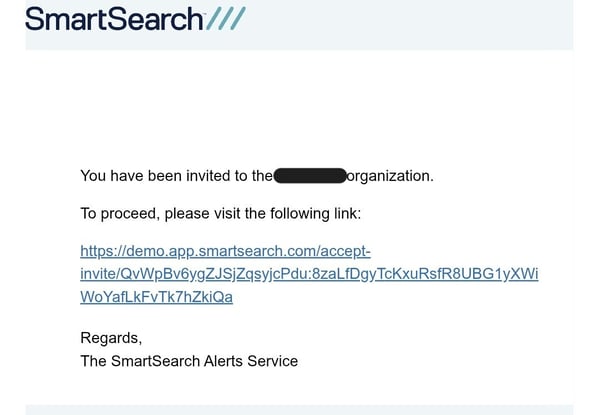
Please be aware that this link will expire and need refreshing after a few days, so you'll need to go back to your account admin to re-send it, if this is the case.
Admin - If your account admin is unfamiliar with inviting users, please refer to "How To Manage Users" in this knowledge base
2. Register
Note - If you are currently signed in as a different user , you must sign out through our platform, app.smartsearch.com, before proceeding. As an extra precaution, you may also clear your browser cache and cookies before proceeding.
After clicking the invite link, you will be taken to app.smartsearch.com, and prompted to either "Register" or "Login".
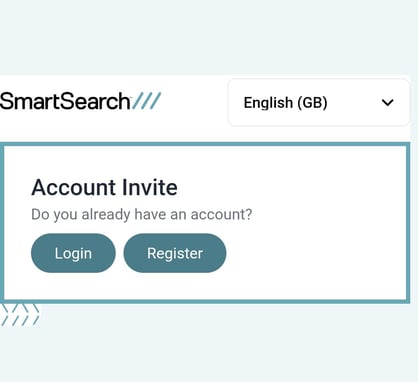
Here, click "Register", and create your name and password. Ensure this is unique and secure, differing from any other user profiles on your account.
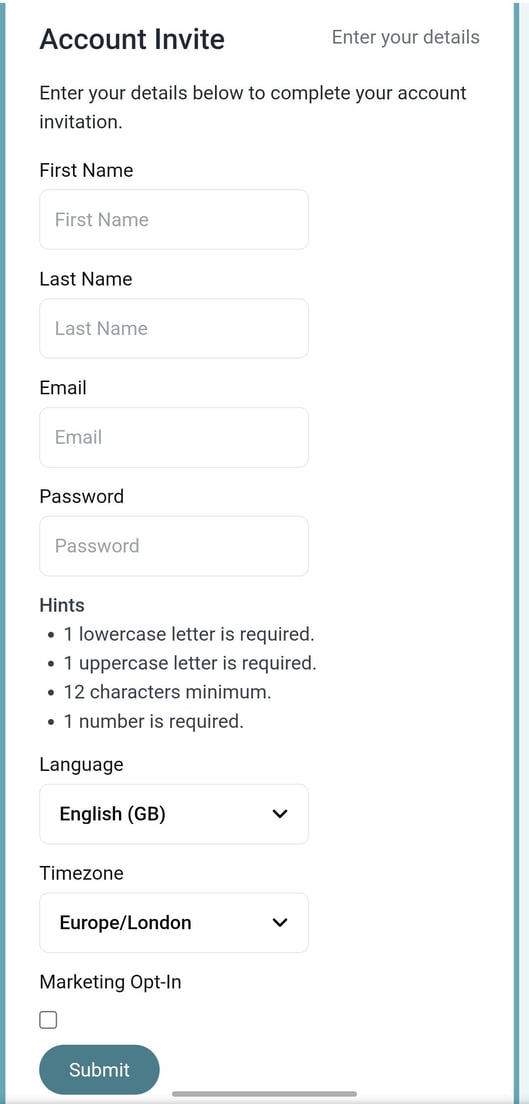
3. Finalise
You should be taken to the dashboard from here, at which point you may bookmark the website, so you can return to it easily in future.
User Login
Once registered as a user for a SmartSearch account, the process to sign in is quick and easy.
1. Go to the app
To reach the SmartSearch web app, you can navigate via this link: app.smartsearch.com
Shortcut - To always come back to SmartSearch, feel free to bookmark the above website, as it's the quickest way to navigate to the dashboard.
2. Log in / SSO
At this point, as a current user, you may click "Log in" and input your credentials. Clicking "Submit" with the correct info should take you to the dashboard, where you may begin running AML checks with us.
However, if your account has our Single Sign On service enabled, then you may access through your organization, without the requirement to input your password information each time. Feel free to speak to your account manager to find out more about activating this capability.