
There are various levels of access that a user can be assigned on the SmartSearch platform. These aim to give our customers the full flexibility to align access to particular aspects with their internal structures and policies.
How to Assign Roles
In order to set or change a user's permission levels, this can be done from an "Admin" level user on the same account. This is the role that may also invite and remove users as appropriate. User management is covered in more detail in the "How To Manage Users" article.
Permissions Table
See below the table covering each user level, along with the associated permissions. Any user can run searches, regardless of permissions.
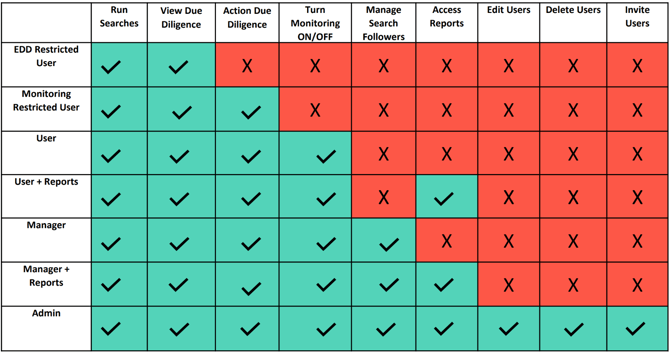
EDD Restricted User - Regular user permissions, except for two restrictions:
- Unable to action due diligence, meaning to confirm whether or not a watchlist match is your client.
- Unable to activate/deactivate monitoring on any subject. Monitoring is the regular screening of watchlists to check for new name matches or updates to watchlist entry details.
Monitoring Restricted User - Regular user permissions, except for one restriction:
-
Unable to activate/deactivate monitoring on any subject. Monitoring is the regular screening of watchlists to check for new name matches or updates to watchlist entry details
User - Regular users can run searches, switch monitoring status and action due diligence alerts. Every “User” level below “Manager” may only view their own searches run on SmartSearch.
User + Reports - These users can perform all regular user actions, with one addition:
- Access to reporting features, as long as the account has these active. Ask your account manager if you'd like further details.
Manager - These permissions are designed for regular users with full oversight of searches run by all other users
Manager + Reports - These users can perform all Manager actions, with one addition:
- Access to reporting features, as long as the account has these active. Ask your account manager if you'd like further details.
Admin - Admins have full access to all features on the account, including:
- Full platform visibility
- Access to reports, if applicable
- User management capabilities (refer to "How to manage users")